was not fully uploaded. Reselect the same saved file through Browse/Files to continue where it stopped.
Upload Complete!
Please select the image resolution and click begin to start processing.
Estimated time: (Time can vary based on server load)
Upload complete
Choose the settings, then begin stitching.
Uploading video
Keep this page open and the screen on. Stitching starts when the upload ends.
Please Wait
Something went wrong!
DeepLIIF (DeepLearning Inferred ImmunoFluorescence) is a virtual restaining and quantification AI model for standard immunohistochemistry (IHC) images.
Image Upload Requirements
Maximum image size: 4096 x 4096 pixels.
For best results, use an image with resolution of 10X or higher.
Supports any of the more than 150 image formats that meet the Bio-Formats standard.
Do not upload images with protected health information (PHI) or personally identifiable information (PII).
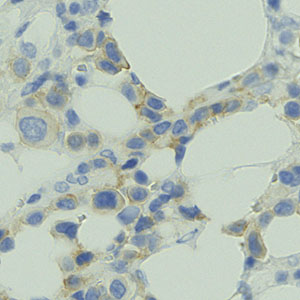
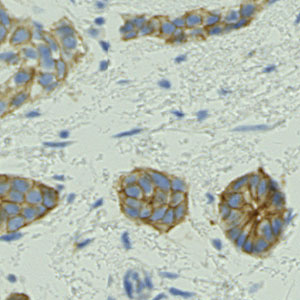
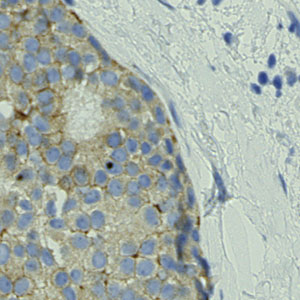
Upload an image above or process one of these sample images by clicking on it:
512 x 512 | Ki67 Marker | 40x Image from BCDataset
512 x 512 | Ki67 Marker | 40x Image from BCDataset
513 x 513 | Ki67 Marker | 40x Image from DeepSlides
513 x 513 | Ki67 Marker | 40x Image from DeepSlides
The DP4ALL (Digital Pathology for All) Initiative allows FREE whole-slide image stitching from uploaded videos, which can be viewed and shared using our cloud-based viewer.
Videos can be acquired using either an attached microscope camera or via a cell phone camera mounted on an adapter.
Video Upload Requirements
Use an MP4, AVI, or MOV video less than 3 GB in size.
Record the video with smooth, slow motion with regular pauses to clearly capture all parts of the desired sample.
Do not upload images with protected health information (PHI) or personally identifiable information (PII).
During scanning• Clean slide and microscope lens.• Use a stage and move slowly.• Make brief but complete pauses at every section of the sample to avoid motion artifacts.• Have significant overlap between pauses so that there is sufficient context for stitching frames together.• Methodical and consistent movement over the sample. For example, smoothly sweeping row by row from top to bottom.• Try not to backtrack to the same field. This tends to happen at the end of a fragment of tissue.• Keep tissue in good focus throughout video.• Do not overly compress video, which can lead to noticeable artifacts.• Do not switch between magnifications during a single video.• Keep a 20X scan to about 6 minutes per slide. At 1080p that is about 330 MB, so 10 GB of free space holds about 30 slides.• File size limit is 3 GB.Setup if using a cell phone• Turn off any autofocus feature on the cell phone camera.• Mount the cell phone onto the microscope using an adapter.• Position the slide at your starting point prior to recording.• Select video mode and keep the camera at 1x. Do not zoom in: the dark ring around the field must stay visible, because it is used to measure size.• Turn up microscope light to highest setting - make sure the field is as evenly white as possible. The dark ring around the field is expected; avoid shadows inside it.• Record at 1080p HD, 30 frames per second. Do not use 4K or 60 fps: they make the video 2 to 7 times larger.• Use the smaller video format: on an iPhone, Camera > Formats > High Efficiency; on Android, HEVC or H.265 (sometimes called High efficiency video) in the camera's video settings, if offered.• On an iPhone, turn off HDR Video (Settings > Camera > Record Video), and any HDR video option on Android. HDR videos stitch with faded colors.• On the upload page, pick the number printed on the eyepiece you look into (10x/20 means 20), or Not sure if there is none.After recording• Keep the upload page open and the screen on until the upload is complete; plugging in the phone helps.• Once the slide appears on DeepLIIF, the video can be deleted from the phone. Then empty Recently Deleted (iPhone) or the Trash (Android) to free the space.• If the upload stops, open the page again in the same browser and pick the same video: it continues where it stopped.
How much will this cost?This is for free, with no cost to the users. The Nadeem Lab will incur all costs and pay for it via various sources.Who will pay for the support and usage?Costs will be covered by Dr. Nadeem's grants, MSK, and other philanthropic organizations/foundations. We will maintain long-term support for this.Is DeepLIIF more cost/storage efficient than other scanners/digitization infrastructure?Yes, DeepLIIF is more cost and memory efficient and no physical scanner is needed. There are no maintenance, service, or upgrade fees nor any support required. No expensive enterprise hardware storage is needed with the compulsion to delete older slides before scanning new slides. No separate viewer is needed. DeepLIIF has a slide viewer built into our cloud platform, providing instantaneous scanning, viewing, and sharing of the links/URLs for telepathology and consultancy.What skillset is needed for the DeepLIIF virtual slide scanner?None. We have heard from colleagues in Tanzania and Nigeria that because physical scanners are expensive, only skilled pathologists or physicians can touch them. This is in contrast to our free software driven cloud solution which does not need any special skillset to operate. Any person (educated or not) can be employed to create the videos and generate the corresponding links which can be shared with pathologists/physicians via WhatsApp or email as needed. This can open up a new job opportunity for people without any previous education, and no special training or background is needed.How does DeepLIIF handle (patient/specimen/user) data?No PHI information is recorded or stored. Pathologists or individuals scanning the slides will upload only the pixel-level videos without any patient or specimen identifiers and an anonymized URL link to the slide will be generated. The user will need to maintain this information on their end with any relevant information indexed with our generated URLs. The URL is only accessible to the person who uploaded the video and with people to whom this link was shared (these private links are not publicly available).Does DeepLIIF allow downloading of stitched slides?No. We have not enabled this feature to safeguard the data. If you want access to your stitched whole slide images for research or education, please send us the links for the stitched slides and we can share the whole slide images on your preferred sharing platform.What types of cameras are supported?We support both microscope and cell phone cameras (iPhone or Android devices) with mov, mp4, or avi formats. We will be happy to support any other formats as needed. Adapters are required for cell phone cameras.What types of specimens or stains are supported?The stitching process is specimen and stain agnostic. All types of cytology/hemepath/surgpath specimens are supported along with H&E, IHC, or special stains.What resolution/magnification is supported?We support 10X, 20X, or 40X magnification with the caveat that the entire video needs to be recorded in one resolution (the user cannot switch between one or the other during traversal/recording). Obviously, 10X is faster to record and stitch whereas 20X for finer details takes longer and might require low-resolution spatial context to navigate. We are working with our pathologist colleagues to figure out which use cases require the higher 40X or lower 10X resolutions. For 20X or 40X, the user can also just record the video for a region of interest rather than the whole tissue section to save time and effort.Does this support only core biopsies or resections as well?We support both. In resection or cytology specimens, for example, a user can record for just a region of interest rather than the whole tissue section.How does DeepLIIF handle patchy internet connections?The upload continues by itself after the connection drops. Keep the page open and the screen on until it finishes. If the page was closed, open DP4ALL again and pick the same video (on an iPhone, from Files) to continue where it stopped. Once the upload is complete you can copy the page link and leave: stitching runs on our server, and the link opens the finished slide.I generated stitched whole slide image links for individual serial sections (e.g. H&E and IHC) for the same patient and I would like to view them in the DeepLIIF viewer with a file tree view. Is this possible?Yes. For example you generated a URL for H&E (https://deepliif.org/wsi/viewer?ids=video1) and for PAS (https://deepliif.org/wsi/viewer?ids=video2) for the same patient. You can just add the "ids" from the PAS link to the end of H&E with a ";" to generate the tree with serial sections for the same patient (https://deepliif.org/wsi/viewer?ids=video1;video2).Similar to physical scanners, does this require thorough calibration to work for different stains (IHC, special stains, etc)?No. We follow a What You See Is What You Get paradigm where what you see under the microscope is what you get in the final stitched whole slide image. No calibration is needed like in physical scanners, which are notorious for automated processing that can confound the results if you are not careful (e.g., removal of HER2-low signal in IHC slides).
PLEASE READ THIS DOCUMENT CAREFULLY BEFORE YOU ACCESS OR USE DEEPLIIF. BY ACCESSING ANY PORTION OF DEEPLIIF, YOU AGREE TO BE BOUND BY THE TERMS AND CONDITIONS SET FORTH BELOW. IF YOU DO NOT WISH TO BE BOUND BY THESE TERMS AND CONDITIONS, PLEASE DO NOT ACCESS DEEPLIIF.
DeepLIIF is developed and maintained by Memorial Sloan Kettering Cancer Center (“MSK,” “we”, or “us”) to provide an experimental artificial intelligence driven tool to translate IHC images to more informative mpIF representations, auto-segment relevant cells, and quantify protein expression for more accurate and reproducible IHC quantification. MSK may, from time to time, update the software and other content on https://deepliif.org/ (“Content”). MSK makes no warranties or representations, and hereby disclaims any warranties, express or implied, with respect to any of the Content, including as to the present accuracy, completeness, timeliness, adequacy, or usefulness of any of the Content. By using this website, you agree that MSK will not be liable for any losses or damages arising from your use of or reliance on the Content, or other websites or information to which this website may be linked.
By providing images to be analyzed using DeepLIIF (Submitted Images), you authorize MSK to copy, modify, display, distribute, perform, use, publish, and otherwise exploit the Submitted Images for any and all purposes, all without compensation to you, for as long as we decide (collectively, the "Use Rights"). In addition, you authorize us to grant any third party some or all of the Use Rights. By way of example, and not limitation, the Use Rights include the right for us to publish Submitted Images in whole or in part, and whether cropped, adopted, altered, or otherwise manipulated, for as long as we choose. By providing Submitted Images, you represent and warrant that (i) you own all rights in and to the Submitted Images (including any related copyrights or other intellectual property rights) or have sufficient authority and right to provide the content and to grant the Use Rights; (ii) your submission of the images and grant to us of Use Rights do not violate or conflict with the rights of other persons, or breach your obligations to other persons; and (iii) the Submitted Images do not include or contain any personally identifiable information (PII) or protected health information (PHI).
DO NOT submit personally identifiable information (PII) or protected health information (PHI) in connection with any Submitted Images or otherwise.
You may use DeepLIIF the underlying Content, and images output therefrom for personal or academic research purposes only. You may not use it for any other purpose, including not but limited to use for diagnosis, treatment, or patient care. You may publish in scientific or academic journals or literature the results of such research, subject to providing credit to MSK as the source of output of DeepLIIF and with reference to these Terms of Use. You may not otherwise redistribute or share the Content with any third party, in part or in whole, for any purpose, without the express written permission of MSK.
Without limiting the generality of the foregoing, you may not use any part of the DeepLIIF, the underlying Content or the output for any other purpose, including:
use or incorporation into a commercial product or towards the performance of a commercial service;
research use in a commercial setting;
use for patient care or the provision of medical services; or
generation of reports in a medical, laboratory, hospital or other patient care setting.
You may not copy, transfer, reproduce, modify or create derivative works of DeepLIIF or the underlying Content for any commercial purpose without the express permission of MSK.
The image output of DeepLIIF and the underlying Content is not a substitute for professional medical help, judgment or advice. Use of DeepLIIF does not create a physician-patient relationship or in any way make a person a patient of MSK. A physician or other qualified health provider should always be consulted for any health problem or medical condition.
Neither these Terms or Use nor the availability of DeepLIIF should be understood to create an obligation or expectation that MSK will continue to make DeepLIIF available. MSK may discontinue or restrict the availability of DeepLIIF at any time. MSK may also modify these Terms or Use at any time.
MSK respects the intellectual property rights of others, just as it expects others to respect its intellectual property. If you believe that any content (including Submitted Images and Content) on the website or other activity taking place on the website constitutes infringement of a work protected by copyright, please notify us at:
cmsdigitalteam@mskcc.org
Your notice must comply with the Digital Millennium Copyright Act (17 U.S.C. §512) (the "DMCA"). Upon receipt of a compliant notice, we will respond and proceed in accordance with the DMCA.
By using DeepLIIF, you consent to the jurisdiction and venue of the state and federal courts located in New York City, New York, USA, for any claims related to or arising from your use of DeepLIIF or your violation of these Terms of Use and agree that you will not bring any claims against MSK that relate to or arise from the foregoing except in those courts.
If any provision of these Terms of Use is held to be invalid or unenforceable, then such provision shall be struck, and the remaining provisions shall be enforced. Headings are for reference purposes only and in no way define, limit, construe, or describe the scope or extent of such section. MSK’s failure to act with respect to a breach by you or others does not waive its right to act with respect to subsequent or similar breaches. This agreement and the terms and conditions contained herein set forth the entire understanding and agreement between MSK and you with respect to the subject matter hereof and supersede any prior or contemporaneous understanding, whether written or oral.
Please scroll to read and acknowledge the above terms of use.